Facilitator guide
Case objectives, demonstration plans, debriefs, common mistakes and application checks across all 81 workplace cases and method lessons.
Download Facilitator guide PDF · 166 pages · 65.1 MB OPEXSTUDIO
Prepare learner and materials. Follow the visual, practise a decision, then check your thinking.
Fictional teaching examples and AI-generated illustrations. Proposed changes and goals are not achieved results. Use the written instructions and check local conditions before applying a method.
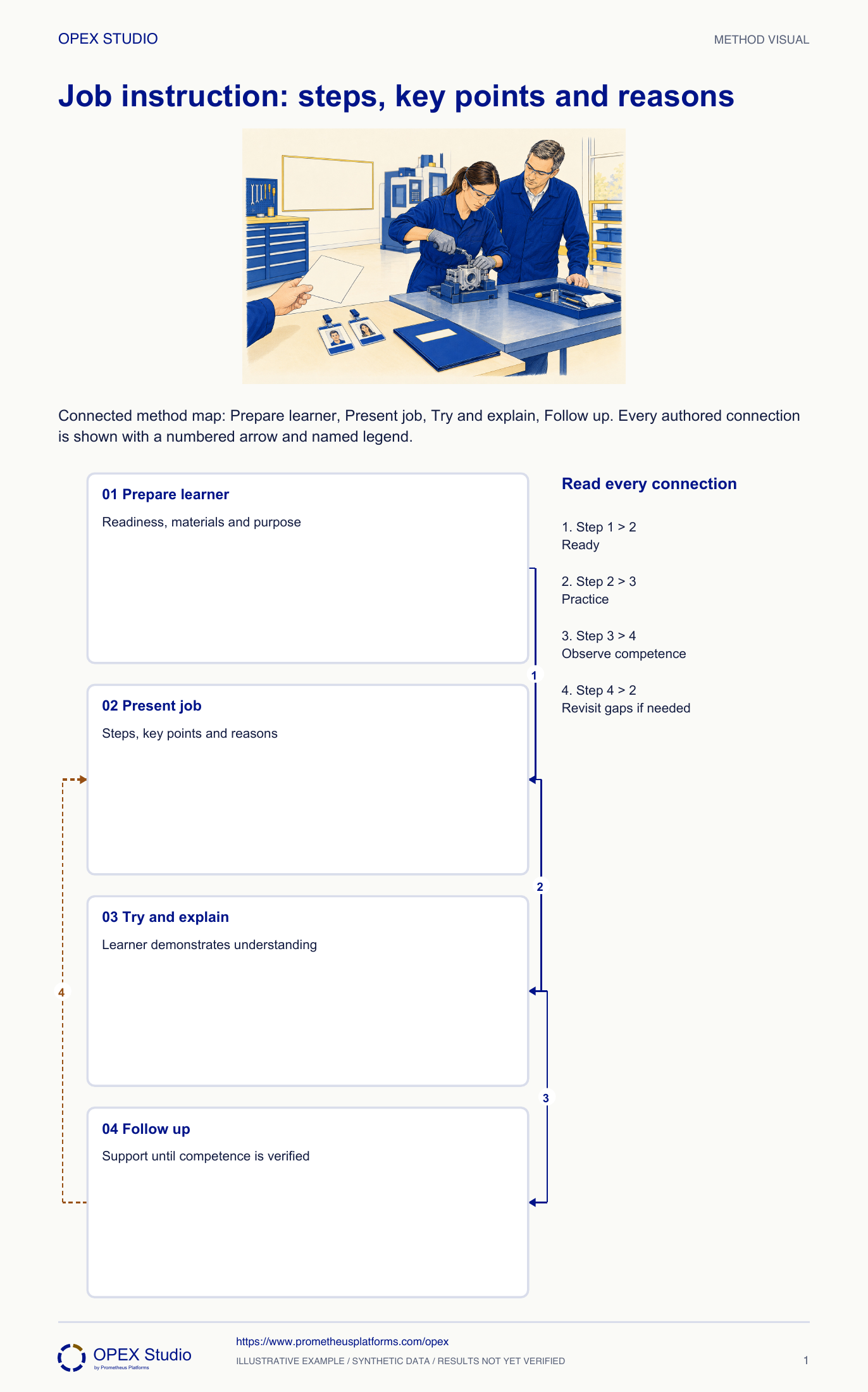
Prepare the learner, the task and the materials before instruction begins. Present the important steps, key points and reasons at a pace the learner can absorb. Then ask the learner to perform the work and explain those points while the instructor observes. Correct gaps and follow up until competence is demonstrated under the expected conditions. Attendance or watching once is not enough. Use an approved job breakdown, and distinguish training notes from the production chart used to balance a process. Good instruction also reveals unclear standards that need improvement rather than repeated reminders to the learner.
Showing once is not training completion.
Do not confuse instruction with production balance chart.
Makes standardized work usable; Skills readiness supports cross-training.
Fictional administration team: instructor Sana teaches new colleague Luis how to register a received change request in a training system. The approved task requires matching the request identity, recording the received time and assigning the authorized queue. A look-alike request number makes a deliberate identity check important.
Revisit that key point and reason, then observe another attempt where the distinction matters. Keep supported-practice status rather than declaring full task competence.
A memorized sequence without understanding may fail when a small condition changes.
Teach an approved repeatable task through important steps, key points and reasons, then assess the learner’s demonstration and follow-up need.
Fictional administration team: instructor Sana teaches new colleague Luis how to register a received change request in a training system. The approved task requires matching the request identity, recording the received time and assigning the authorized queue. A look-alike request number makes a deliberate identity check important.
Role: Qualified instructor and learner using an approved method in a synthetic training environment.
The learner performs the task correctly and explains the key points and their reasons before support is reduced.
Luis watched the task once and signed attendance, but his first attempt selected the similar request number.
| Training reference | Declared requirement |
|---|---|
| Correct request | CR218; compare source and screen identity |
| Look-alike | CR281; wrong record for this task |
| Received time | 09:12 from supplied source, not current clock time |
| Queue | CHANGE-REVIEW under the approved routing reference |
| Completion | Save, reopen and verify identity/time/queue |
Sana explains the task outcome, checks Luis’s prior experience and positions the materials so he can follow. She confirms the approved method and prepares a short job breakdown.
Why: A learner should know what the task accomplishes and be ready to see the important details.
Evidence: Training system, source request and routing reference are available.
She demonstrates selecting CR218, entering the supplied received time, assigning the queue and verifying the saved record. For each important step she states the key point and why it matters.
Why: A recital of clicks omits the judgment that prevents the look-alike error.
Evidence: The job breakdown pairs source/screen identity with preventing wrong-record changes.
Luis performs the task, explains the key points and then the reasons. Sana observes rather than completing the task for him, correcting any error before the training result is accepted.
Why: Watching the instructor or repeating words is not a demonstration of the task.
Evidence: The observation records which step, key point or reason needs coached practice.
After a correct practice, Sana defines whom Luis can ask for help and checks another representative training request, including a different look-alike. She reduces support only as demonstration warrants.
Why: One memorized example may not show that the key point transfers.
Evidence: Follow-up record names task conditions, observed performance and next practice; attendance is retained separately.
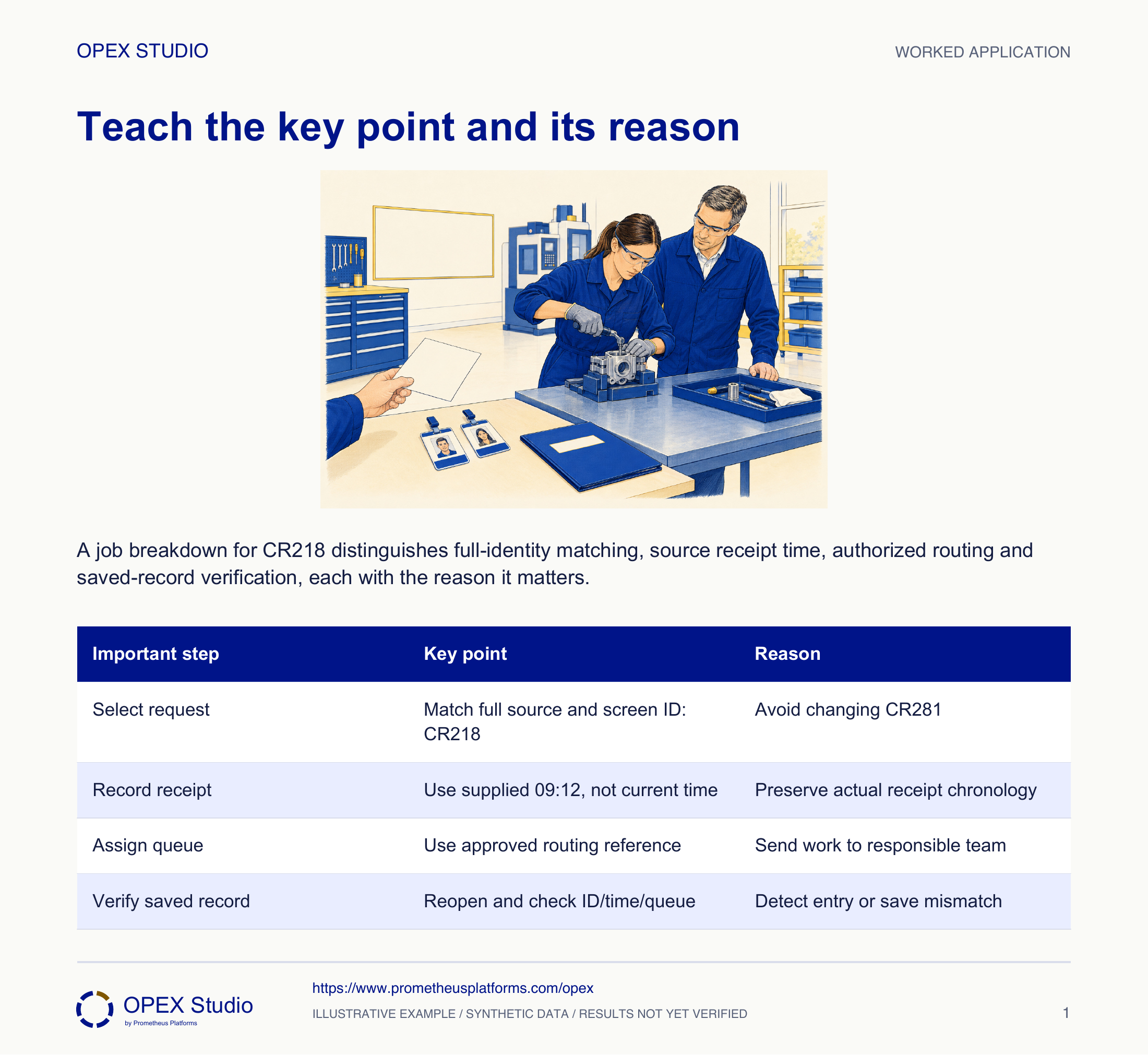
| Important step | Key point | Reason |
|---|---|---|
| Select request | Match full source and screen ID: CR218 | Avoid changing CR281 |
| Record receipt | Use supplied 09:12, not current time | Preserve actual receipt chronology |
| Assign queue | Use approved routing reference | Send work to responsible team |
| Verify saved record | Reopen and check ID/time/queue | Detect entry or save mismatch |
Luis completes a second example but says the identity check is only because Sana prefers it. He cannot explain the look-alike risk.
Revisit that key point and reason, then observe another attempt where the distinction matters. Keep supported-practice status rather than declaring full task competence.
A memorized sequence without understanding may fail when a small condition changes.
Observe the learner deliberately comparing identities and explaining the consequence of a mismatch.
New fictional task: a colleague must retrieve the approved instruction for task T6. Two files have similar names: a current controlled revision and an obsolete copy. The approved process requires checking status/revision before use and reporting a missing current copy.
| File / condition | Status |
|---|---|
| T6 controlled reference | Current; revision shown by authority |
| T6 old download | Obsolete; not for use |
| Current copy unavailable | Use escalation route; do not guess |
A suitable breakdown retrieves the controlled source, checks task identity/status/revision and confirms the instruction is usable for the assigned task. The reason is avoiding an obsolete or wrong instruction.
The learner should identify the authority and explain the check, including the missing-copy response. A different file arrangement tests whether the reason transfers.
If selection depends only on position, reteach the key point and observe a changed layout; do not accept a lucky correct selection as sufficient.
| Important step | Key point | Reason |
|---|---|---|
| Retrieve | Use controlled source | Avoid obsolete downloads |
| Check | Task identity, current status/revision | Confirm applicable instruction |
| Respond | Escalate missing current copy | Do not improvise from old version |
Which detail prevents the important error?
Why use the source receipt time?
Can the learner explain the key point?
What changed case would test transfer?
Create a breakdown and record a spoken teach-back; use a changed example to check whether the reasons still guide action.
Owner: Qualified instructor with task/process owner
Record: Approved job breakdown and demonstrated-skill follow-up
Review: During try-out and subsequent representative task observations
Evidence: Correct performance, explained key points/reasons and appropriate help seeking
Revisit the specific teaching gap or escalate an unclear method; retain support until competence is demonstrated.
Prepare, present, try out, follow up; steps/key points/reasons
Method reference; original OPEX scenario and diagram are synthetic teaching content, not source case results.Read the lessons online or use these PDFs to prepare, practise and review with your team. No sign-in needed.
Case objectives, demonstration plans, debriefs, common mistakes and application checks across all 81 workplace cases and method lessons.
Download Facilitator guide PDF · 166 pages · 65.1 MBPrintable case worksheets, blank observation records and five calculation exercises; answers are separate.
Download Learner workbook PDF · 169 pages · 10.7 MBReasoned sample responses, worked calculations and coaching guidance; fictional examples are clearly labelled.
Download Answer key and coaching notes PDF · 105 pages · 8.5 MBThe native method mechanisms and worked applications for all 68 detailed lessons, in a separate bookmarked portrait reference.
Download Method and application reference PDF · 141 pages · 10.2 MBFive illustrated system chapters: 15 Flare concept maps and 26 original workplace teaching cards, with links to all 81 supporting cases and method lessons.
Download Illustrated systems atlas PDF · 69 pages · 55.8 MBExplore this connected method and its separate application conditions.
Explore the connected method →Explore this connected method and its separate application conditions.
Explore the connected method →Explore this connected method and its separate application conditions.
Explore the connected method →Explore this connected method and its separate application conditions.
Explore the connected method →